

Creative Digital Strategies
for Business Success
Contact Information
Custom AI Automation
Automate the Work Your Team Shouldn't Be Doing Manually
Automate repetitive business processes with AI-powered workflows built around the way your business actually operates. We build custom chatbots, WhatsApp workflows, AI agents, system integrations and automated processes using n8n, Make, Python and modern AI APIs.
This page is for businesses that are losing hours to work that a properly configured automation can do faster and without mistakes.
5.0 on Clutch
150+ builds shipped
You own the code
multidivs.com — engineered
Your product, engineered
Core Web Vitals
LCP · INP · CLS ✓
owner = "you"
no lock-in
Chatbot automation
WhatsApp automation
n8n workflows
Make scenarios
24/7 operation
You own the workflows
US, UK & Canada
Lead qualification
Chatbot automation
WhatsApp automation
n8n workflows
Make scenarios
24/7 operation
You own the workflows
US, UK & Canada
Lead qualification
The honest test
When should you invest in custom AI automation?
Automate when the same multi-step process runs every day, when work waits on someone to move it forward, when staff copy data between systems by hand, or when a template can't hold the logic your process actually needs. If the job is small, rare, or a single trigger and action, an off-the-shelf tool is the smarter spend.
"The processes worth automating are rarely the ones people complain about. They're the dull, frequent ones nobody notices anymore, because they've stopped counting the hours.
— Experience marker to insert
Diagnosis
Signs your business is ready to automate
The drag builds quietly. You rarely get one clear breaking point. You get manual work that compounds as you grow.
01
Copy-paste between systems
Staff move the same data between your CRM, spreadsheets, and finance tools by hand, all day.
02
Work waits on people
Requests, approvals, and handoffs sit in an inbox until someone remembers to forward them.
03
Leads and tasks go cold
Things slip because no one followed up in time, not because the work was hard.
04
Templates that can't cope
Your Zapier or off-the-shelf flow breaks the moment the process needs a decision or an exception.
05
Reporting eats hours
Someone rebuilds the same report every week by pulling numbers from five places.
06
Growth means more hiring
The only way you know to handle more volume is more headcount doing repetitive work.
Worth it vs not
A straight test, not a sales pitch
Businesses waste money automating the wrong things, or wait years and drown in manual work. Here's the line.
AUTOMATE
// custom AI automation earns its cost when
- A multi-step process runs often and follows rules you can describe.
- Work touches several systems that don't talk to each other cleanly.
- Manual handoffs, data entry, or follow-ups are costing real hours every week.
- You're scaling and don't want the headcount to rise in lockstep with volume.
- A process needs judgment a rigid template can't handle, which is where AI fits.
DON'T HIRE US
// hold off when
- The task is small or rare enough that a simple template already does it.
- The process isn't documented or agreed yet. Fix the process first, then automate it.
- Every run is genuinely different and needs a person from the first step.
- You're automating to avoid a decision you actually need to make.
Turning away work you don't need is the fastest way we know to earn trust.
In demand right now
10 high-demand custom AI automation use cases
The builds businesses ask for most, and why each one earns its place.
A
Lead capture and follow-up automation. Routes and nurtures new leads the moment they arrive. Used to stop leads going cold when no one replies fast enough.
B
AI sales agent and SDR automation. Qualifies leads, books meetings, and updates the CRM. Used to keep the pipeline moving without manual chasing.
C
Invoice and accounts payable automation. Reads, matches, and processes invoices. Used to cut manual data entry and payment delays in finance.
D
Document processing and data extraction. Pulls structured data out of PDFs, forms, and emails. Used to remove hours of copy-paste from back-office work.
E
CRM and data-sync automation. Keeps records consistent across every tool. Used to kill duplicate entry and give the business one source of truth.
F
Client and employee onboarding automation. Triggers the full setup sequence on day one. Used to turn multi-hour onboarding into minutes.
G
Reporting and dashboard automation. Compiles and sends reports on a schedule. Used to replace the weekly manual reporting grind.
H
AI voice agents. Answer calls, book appointments, and route in natural speech. Used to cover the phones around the clock without a call team.
I
Internal knowledge assistant. Answers staff questions from your own documents. Used to stop employees hunting through wikis and chat threads.
J
Approval and workflow routing. Moves requests through the right people automatically. Used to clear the bottlenecks where work waits on a forward.
Our projects
All projects
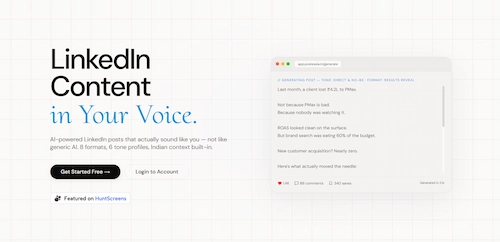
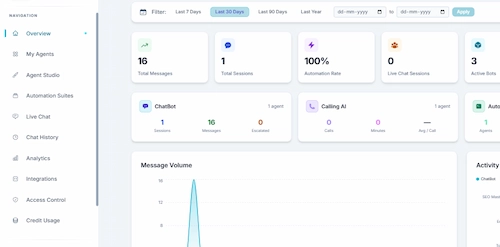
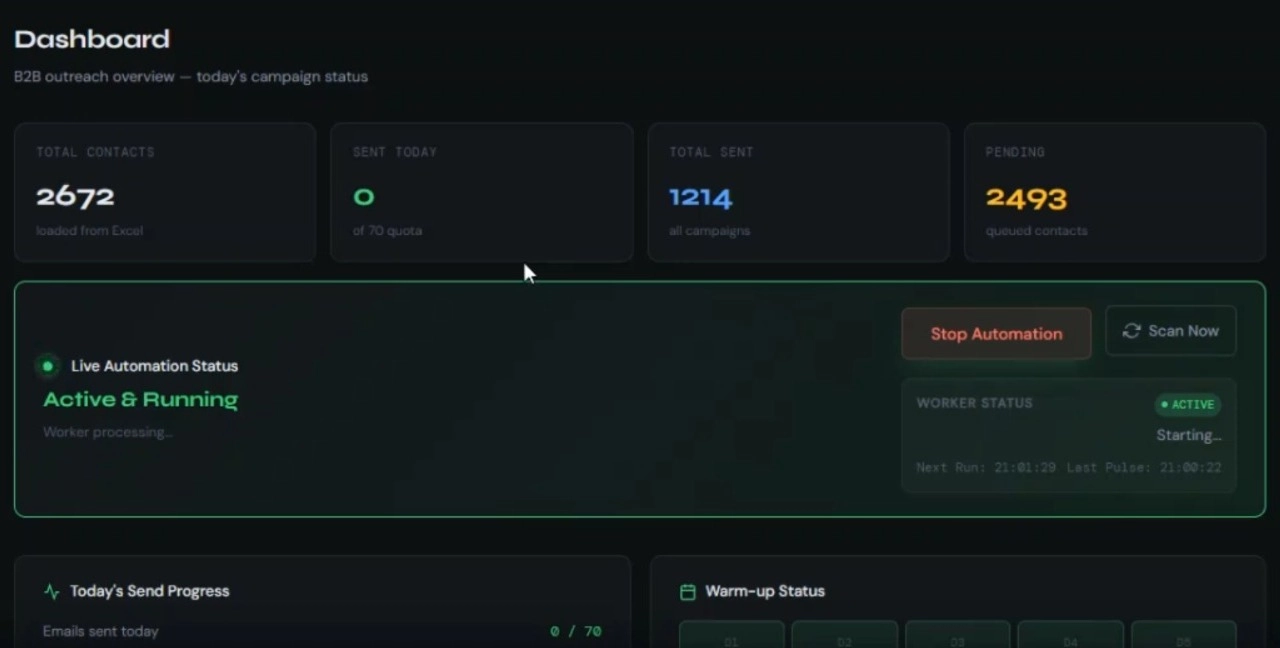
Featured automation work
Our delivery method
The FRAME method: how we build
Most agencies start by picking a tool. We start with your process, because the broken automations we get called in to fix almost always failed on unclear process and messy data, not on the technology.
F
STEP 01/05
Frame the process
The workflows you run, the volumes, the systems involved, and what a good outcome looks like. The build maps to real operational goals. If a template would do, this is where we say so.
R
STEP 02/05
Research the workflow and data
We map every step, decision, and exception, and check the data the automation will depend on, so nothing breaks on an edge case later.
A
STEP 03/05
Architect the automation
The integration layer, the orchestration, the AI and retrieval parts, the human checkpoints, and the guardrails. The stage most quick automations skip and most rebuilds regret skipping.
M
STEP 04/05
Make: build and test
We build the workflows, connect your systems over proper APIs, add AI where it earns its place, and test against real cases before anything runs on live data.
E
STEP 05/05
Evolve after launch
Monitor reliability, catch the exceptions the real world throws, and keep improving. Automation is maintained, not shipped once and forgotten.
A single focused automation takes a few weeks. A connected set of workflows or an AI agent with deep integrations takes longer. Anyone quoting a firm timeline before the Architect stage is guessing.
n8nMake
ZapierGPT and Claude class models
HubSpotSalesforce
Zendesk Twilio
WhatsApp BusinessNode.jsREST APIs
n8nMake
ZapierGPT and Claude class models
HubSpotSalesforce
Zendesk Twilio
WhatsApp BusinessNode.jsREST APIs
Under the hood
What "built properly" actually means
Every automation is a set of process and engineering decisions, and each one has consequences for reliability, maintainability, and whether the automation keeps running six months later.
05 · Reliability
We build error alerting into every workflow from the start. You know when something fails before it causes downstream damage. That's not optional, it's the standard we apply to every build.
80%
WhatsApp open rate
24/7
operational coverage
0
silent failures
01
Process documentation
An automation can only follow steps that are written down and don't change constantly. We document the process before building it. If the steps aren't clear before we start, we make them clear first.
02
Tool selection
n8n suits self-hosted, open-source infrastructure. Make suits a managed, visual platform. The choice depends on hosting requirements, complexity, and what the workflow connects to. We recommend based on your situation, not on which tool we prefer.
03
Connection and authentication
APIs, webhooks, OAuth tokens, and API keys, every connection handled with proper authentication and the correct credential scope. Poorly authenticated connections fail in unpredictable ways.
04
Error handling and alerting
Every workflow includes failure states and alerting. When a step fails, a webhook times out, an API returns an unexpected payload, the alert reaches you before the data problem reaches the customer.
06
Testing with real data
Automations tested against actual inputs, not synthetic test data that never reflects the edge cases real usage produces. Happy-path testing is not sufficient for production automations.
07
Handover documentation
Every workflow handed over with documentation detailed enough for you or another developer to maintain, modify, or extend without needing a briefing from us.
08 · Workflow ownership
The n8n instance, the Make scenarios, the webhook configurations, the documentation, all yours at handover. No subscription to us, no proprietary tool that only we can access or modify.
TECH STACK TICKER "WE BUILD WITH THE BEST TOOLS AND BEYOND THEM"
n8n
Make
WhatsApp Business API
Python
Node.js
Claude API
OpenAI
Webhook handlers
PostgreSQL
REST APIs
Supabase
GitHub Copilot
Claude Code
n8n
Make
WhatsApp Business API
Python
Node.js
Claude API
OpenAI
Webhook handlers
PostgreSQL
REST APIs
Supabase
GitHub Copilot
Claude Code
An honest comparison
Off-the-shelf tool vs custom AI automation vs manual
Most vendor content pushes you toward the biggest build. Here are the real trade-offs, including where custom loses.
| Criteria | Off-the-shelf template | Custom AI automation | Manual / in-house |
|---|---|---|---|
| Setup cost | Lowest | Higher | None upfront |
| Handles multi-step logic | Poorly | Well | Depends on staff |
| Adapts to your exact process | Limited | Fully | Fully, slowly |
| Cost as volume grows | Low | Lowest | Highest |
| Ownership | You rent the tool | You own the logic | You own the labor |
| Best for | Simple, fixed tasks | High-voComplex, frequent processes | Rare, judgment-heavy work |
If a template covers your task, use it. Custom automation wins when the process is frequent, multi-step, and worth more than the build costs.
How it pays back
How AI automation pays back
~80%
WhatsApp message open rate
WhatsApp messages see an average 80% open rate vs roughly 20% for email. (WhatsApp Business, 2025) An automated WhatsApp workflow reaches customers at a rate no email sequence matches.
24/7
Hours of operation
Automated responses don't stop when the team is offline. Every lead, every support query, every order update, handled at the moment it arrives.
0
Silent failures
Every workflow we build includes error alerting. When something breaks, you know immediately, not when someone notices the data is wrong three days later.
Ownership
Do you own the workflows? Yes.
Every automation we build is yours. The n8n instance, the Make scenarios, the documentation, all of it transfers at handover. No subscription to us, no proprietary tool that only we can access.
// license.config
owner = "you";
lock_in = false;
portable = true;
owner = "you";
lock_in = false;
portable = true;
Learn from these
Common mistakes in automation projects
The failures we get called in to fix repeat themselves.
A
Automating a broken or undocumented process, so you just speed up the mess.
B
Chasing the annoying task instead of the frequent one that quietly costs the most.
C
No human checkpoint on steps that move money or touch customers.
D
Building on a tool the in-house team can't maintain after handover.
E
Treating launch as done, with no monitoring for the exceptions real data brings.
Answered directly
Frequently asked questions
What is AI automation?
Using AI and workflow tools to handle tasks automatically without a person doing it manually each time.
Can you automate our WhatsApp customer messages?
Yes. WhatsApp Business API connected to n8n or Make workflows with AI response logic.
Do you use n8n or Make?
Both. n8n for self-hosted open-source. Make a managed visual platform. We recommend it based on your requirements.
Can the chatbot connect to our existing systems?
Usually yes, if those systems have an API. Confirmed during scoping.
What if the automation breaks?
Error handling and alerting built into every workflow. You know when something fails before it causes a problem.
How much does AI automation cost?
Depends on complexity and integrations. We quote after scoping.
Ready when you are
Find out what's worth automating
Tell us the processes eating your team's time and the tools you run. If custom AI automation is the answer, we'll come back with a scope and a recommendation. If a simpler fix serves you better, we'll tell you that too.
+91 9898 927 052 · contact@multidivs.com